Call Us Free: 1-888-334-1276
VoyeurLife Mode — Miricam Enterprise
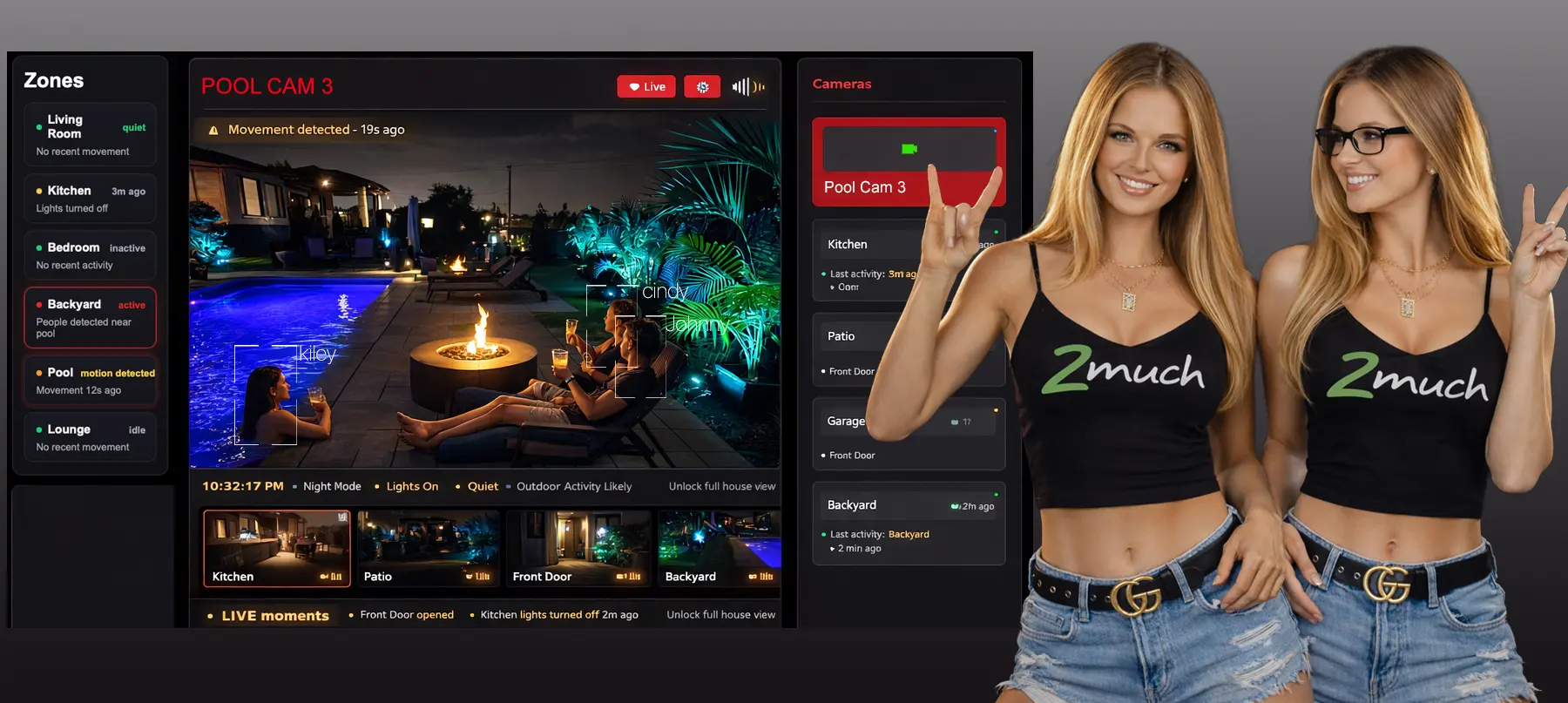
Miricam VoyeurLife Mode operator dashboard showing multi-zone live feeds, camera list, live activity indicators, and the Live Moments strip
The VoyeurLife operator dashboard. Left: zone navigator with live indicators. Centre: active feed — Pool Cam 3 with Miristream Server facial recognition overlays. Right: camera roster with viewer counts. Bottom: Live Moments strip.
Always on. No performer schedule required.

Zone-driven live environments. Recurring subscription revenue, around the clock.

VoyeurLife Mode is a native Miricam Enterprise feature that replaces the performer-led show model with always-on RTMP camera feeds organised into navigable zones. Members subscribe for monthly access to continuous live environments — living rooms, pool areas, studios, communal spaces — and move between them freely. Your existing Miricam chat, member accounts, tipping, and interactive webcam features remain fully active as a complementary revenue layer.

Miricam VoyeurLife Mode is a Miricam Enterprise feature by 2MUCH.NET — it adds always-on RTMP zone cameras, recurring subscription billing, Miristream Server facial recognition with follower alerts, and server-side recording to any Miricam webcam platform.

Always-on RTMP feeds — no live performer required to earn
Zone navigation with live activity indicators per camera
Miristream Server facial recognition with instant follower alerts
Recurring monthly subscriptions — predictable, passive revenue
Chat, tipping & private shows remain live alongside voyeur feeds
What VoyeurLife Mode is

A continuous live environment your members can explore.

Standard Miricam is built around performers: a model goes live, members join, a session runs, revenue is billed per minute. VoyeurLife Mode introduces a parallel model where the content is the space itself — multiple fixed RTMP cameras covering different zones of a location, streaming 24 hours a day regardless of what is happening in front of them.

Members navigate between zones using the left-panel zone list. The main feed occupies the centre of the screen. Miristream Server processes every feed server-side, applying facial recognition overlays that label detected individuals directly inside the video frame. When a recognised person enters a zone, their followers receive an instant push notification so they never miss a moment. A Live Moments strip at the bottom of the dashboard surfaces auto-clipped highlights as they happen, keeping members engaged even when a zone is quiet.

Revenue comes primarily from recurring monthly subscriptions rather than per-minute billing. Miricam’s interactive layer — performer-led shows, private chat, cam-to-cam, tipping — continues to operate in parallel, giving operators two distinct income streams from the same platform and the same membership base.

See the full VoyeurLife technical feature reference →
24/7
Always-on streaming
Cameras per platform
$ / mo
Subscription billing
RTMP
Universal camera input

Zone Navigation

The left panel organises every camera into named zones. Members click to switch. Live activity indicators pulse next to zones with detected motion or recognised faces, drawing attention to the most active feeds in real time.

Universal RTMP Input

Any camera or encoder that can push an RTMP stream connects directly to your Miricam media server. IP cameras, Unifi systems, Hikvision, Dahua, Axis, OBS-driven feeds, and hardware encoders all work without additional middleware.

Facial Recognition & Follower Alerts

Miristream Server analyses every feed in real time, labelling recognised individuals with name chips drawn directly on the video frame. When a person a member follows returns to the location or enters a new zone, that member receives an instant push notification — so fans are always the first to know their favourite performer is back, without having to keep the platform open.

Recording & Rewind

Every camera feed is recorded server-side on a configurable rolling window. Members can rewind any zone up to the start of the current session and scrub back through recent activity they missed. Operators can also designate specific recordings as archived content, making them available as premium on-demand access within the subscription tier or as a separately purchasable clip.

Interact with Performers

Voyeur viewing is passive by default, but members are never locked out of interaction. From any zone feed, a member can send a direct notification to a performer visible in the frame, open a live chat with them, or send a tip. Performers can choose to escalate that conversation into a full private show without the member ever leaving the VoyeurLife interface.

Live Moments Strip

A thumbnail strip at the base of the dashboard surfaces automatically clipped moments as they occur across all zones. Members can jump directly to a recent highlight without leaving the session, increasing time-on-site and subscription retention.

Subscription Billing Engine

VoyeurLife feeds are billed as recurring monthly subscriptions rather than per-minute sessions. Tiered access levels let you gate specific zones or camera counts behind higher-price tiers. Miricam handles all recurring billing, renewal, and churn management.

Full Miricam Integration

VoyeurLife is a mode within Miricam, not a separate product. Performer-led shows, private chat, cam-to-cam, tipping, fan club subscriptions, and the full admin panel operate in parallel. Members interact with live performers or browse the zone feeds from the same session.

Revenue model

Subscription revenue that does not depend on a performer being online.

VoyeurLife introduces a revenue stream that operates independently of your performer roster. The feeds run continuously. Member subscriptions renew monthly. Your interactive cam platform earns on top.

Deployment models

What operators use VoyeurLife Mode for.

VoyeurLife is architecture-agnostic. The same feature works across very different business formats because the core mechanic — always-on feeds, zone navigation, subscription access — is the same in all of them.

Multi-model premises High-volume

Content Houses & Studios

Multiple performers sharing a managed space. Communal areas, pool, kitchen, and lounge zones run as always-on feeds. Private rooms activate only during scheduled interactive shows. Subscribers pay monthly for continuous access to the shared environment and spend additionally on private sessions.

12+ cameras Zone tiering Per-room access control
Structured format Retention-driven

Reality & Social Formats

A defined cast of performers in a single location, structured as a watchable social format. Multiple camera angles across communal and private zones. Scheduled events, introduced via the Live Moments strip, drive appointment viewing. Subscriber counts and the community chat feed reinforce social investment in the cast.

Cast management Scheduled events Live Moments curation
Getting started

From camera hardware to live subscriptions.

VoyeurLife Mode is configured and activated by the 2MUCH.NET team as part of your Miricam Enterprise deployment. You define the zones and camera layout; we handle the media server configuration and Miristream Server integration.

Define Your Zones

Work with your account manager to map out the physical spaces and camera positions. We configure each zone name, default camera, and access tier in the admin panel before your cameras are connected.

Connect Your Cameras

Point any RTMP-capable camera or encoder at your Miricam media server stream key. IP cameras, Unifi systems, and hardware encoders connect without additional software. We verify each feed and confirm encoding parameters before go-live.

Configure Subscription Tiers

Set your monthly price points, define which zones are accessible at each tier, and configure your freemium preview cameras. Miristream Server facial recognition profiles are uploaded and mapped to cast members at this stage, along with follower alert preferences.

Launch and Earn

Your VoyeurLife environment goes live alongside your existing Miricam platform. Recurring subscriptions begin billing immediately. Interactive shows, tipping, and private sessions continue to operate in parallel from day one.

Technical foundation

Enterprise-grade media infrastructure, fully managed.

VoyeurLife Mode runs on the same managed infrastructure as your Miricam platform, extended with Miristream Server for multi-stream ingest, transcoding, and computer vision processing.

Streaming ingest RTMP

Miristream Server

Miristream Server handles all RTMP ingest, adaptive bitrate transcoding, and WebRTC delivery to subscribers. Each camera feed is transcoded server-side and delivered at the appropriate bitrate for each viewer’s connection. GPU transcoding on Enterprise hardware keeps latency under two seconds at 1080p across all simultaneous feeds. All feeds are recorded on a rolling buffer, enabling members to rewind and scrub back through any zone at any point during their session.

RTMP ingest WebRTC delivery GPU transcoding Adaptive bitrate
Computer vision Miristream AI

Facial Recognition Overlays

Miristream Server’s built-in object detection and facial recognition pipeline analyses each live feed in real time. Recognised cast members are labelled with name chips drawn directly on the video frame. Unrecognised faces are flagged with a neutral chip. When a recognised person enters any zone, their followers receive an instant push notification so they can tune in immediately. Recognition profiles are managed through the Miricam admin panel and update across all active feeds simultaneously.

Real-time detection Name overlay chips Admin-managed profiles Multi-feed simultaneous
Common questions

What Enterprise operators ask before activating VoyeurLife.

What is Miricam VoyeurLife Mode?

VoyeurLife Mode is a Miricam Enterprise feature by 2MUCH.NET that adds always-on RTMP camera feeds to your Miricam platform. Members subscribe monthly for continuous access to live environments — living rooms, pool areas, studios — and navigate between zones freely. Miristream Server facial recognition labels performers in real time and alerts their followers. Interactive Miricam features remain active in parallel. Included with Enterprise from $599/month.

Who is VoyeurLife Mode for?

VoyeurLife is for Miricam Enterprise operators who want subscription revenue that runs 24/7 without depending on a performer being live. Ideal for content houses, studios with multiple performers sharing a space, and reality or social format productions. It adds a passive revenue layer alongside — not instead of — interactive cam shows.

Is VoyeurLife a separate product or part of Miricam?

It is a mode within Miricam, included with the Enterprise plan. There is no separate licence, no separate platform, and no separate member login. Your existing Miricam members access VoyeurLife feeds through the same account they use for interactive shows. The admin panel, billing engine, member database, and all other platform components are shared.

What cameras and encoders are compatible?

Any device that can push an RTMP stream to a configurable endpoint. This includes IP cameras from Unifi, Hikvision, Dahua, Axis, and most enterprise-grade manufacturers, as well as hardware encoders and OBS Studio-driven broadcast setups. We test and confirm your specific hardware during the setup phase before your platform goes live.

Can VoyeurLife feeds and interactive performer shows run simultaneously?

Yes. Both content types are active at the same time on the same platform. A member can watch a voyeur zone feed, switch to a performer’s interactive show, tip, enter a private session, and return to the zone feed — all within the same session. Revenue from both models accrues independently and is reported separately in the admin panel.

How does the facial recognition work and who manages the profiles?

Miristream Server processes each camera feed server-side using its built-in computer vision pipeline. You upload recognition profiles — name and reference images per cast member — through the Miricam admin panel. The system matches faces in real time and renders name chips on the live video frame. When a match is confirmed, any member who follows that person receives an instant push notification telling them which zone they have entered. Profiles can be added, updated, or removed at any time without interrupting active feeds.

How are subscription tiers structured?

You define your own tier structure: price, label, and the set of zones accessible at each level. A common configuration is three tiers — a free preview exposing one public camera, a standard tier giving access to communal zones, and a premium tier unlocking all cameras including private rooms. Miricam handles recurring billing, renewal reminders, and failed payment retries automatically.

Is VoyeurLife Mode available on Starter or Professional plans?

No. VoyeurLife Mode is an Enterprise feature because it requires Miristream Server configuration, GPU transcoding for simultaneous multi-feed ingest, and the facial recognition processing pipeline. These are infrastructure components that are not part of the Starter or Professional plan environments. Operators who want to add VoyeurLife to an existing Miricam deployment can upgrade to Enterprise at any time.

Ready to add VoyeurLife?

Let’s scope your zone layout and get you live.

Tell us how many cameras you are planning, the physical spaces you want to cover, and your target subscription price point. We will confirm the Miristream Server configuration required and walk you through exactly what the Enterprise setup involves.

Start the Conversation
Number of cameras
Zones and layout
Subscription model