A page can look perfectly clear to a visitor and still leave a search engine with questions. Is that name the writer or the business? Is the dollar amount a product price, a monthly subscription, or an example in a tutorial? Which image belongs to the article?
Schema markup is structured data that labels those facts and their relationships using the Schema.org vocabulary. It can help search engines interpret a page and, for supported content, establish eligibility for enhanced search appearances. It does not guarantee a higher ranking, a rich result, or a citation in an AI answer. Google’s introduction explains how it uses structured data.
The useful question is not “How much schema can I add?” It is “What does this page contain, and have I described that without introducing contradictions?” That question produces a much cleaner implementation.
Schema.org is the vocabulary. JSON-LD is one way to write it.
Three terms get used interchangeably, but they describe different things:
- Structured data is information arranged in a format that software can interpret consistently.
- Schema.org supplies types such as
Person,ProductandBlogPosting, with properties such asname,authorandoffers. - JSON-LD expresses that information as JSON with linked-data conventions. You usually place it inside a
<script type="application/ld+json">element.
Think of the vocabulary as the labels on a form and JSON-LD as the format used to deliver the completed form. Schema.org’s getting-started guide explains the type-and-property model.
Google supports JSON-LD, Microdata and RDFa, and recommends JSON-LD when the site can use it. It keeps the data relatively easy to maintain without weaving extra attributes through every HTML element. It can sit in the document’s head or body. The JSON-LD block is data; it does not run like ordinary JavaScript.
Also separate valid Schema.org markup from eligibility for a Google search feature. Schema.org describes far more things than Google displays as rich results. Start with Google’s supported structured-data gallery if a particular search appearance is your objective.
Choose types from the content, not from the result you want
Before opening a schema generator, make a short inventory of your page templates. A company home page, a tutorial, a product detail page and a video watch page have different jobs. Giving all four the same markup wastes useful distinctions.
| Page or entity | Likely type | What to describe |
|---|---|---|
| Company identity | Organization | The actual business, its name, URL, logo and verifiable identity details. |
| Blog article | BlogPosting | The headline, author, dates, representative image and publisher. |
| Navigation trail | BreadcrumbList | The page’s position in a useful site hierarchy. |
| Individual product | Product with appropriate Offer data | The specific item and its actual price, currency and availability. |
| Page for watching a video | VideoObject | The video’s title, thumbnail, upload date and relevant playback information. |
| Service description | Service | The service and its provider; do not assume this creates a dedicated Google rich result. |
These are starting points, not interchangeable presets. A software product may call for SoftwareApplication; a business serving customers at a physical location may have an appropriate LocalBusiness subtype. Choose the most specific type that honestly fits, then read its feature requirements.
For company details, Google recommends Organization markup on the home page. A stable business identifier can then be referenced from articles as their publisher. Use sameAs for pages that identify that same entity, such as a verified company profile, rather than as a container for keyword targets or unrelated links.
For streaming sites, a channel directory and an individual watch page need different treatment. Do not label every performer card as a complete video. Follow the VideoObject documentation for actual watch pages and keep live-broadcast information tied to real broadcasts.
Watch for retired advice. Google’s documentation changelog says FAQ rich results stopped appearing in Search on May 7, 2026. HowTo rich results were retired earlier. An FAQ can still help readers, but adding FAQPage markup is no longer a route to Google FAQ rich results. See the current documentation updates and the HowTo retirement announcement.
Example 1: describe an article, its author and its publisher
This example uses the article you are reading. It shows the main fields without including every relationship in this page’s full markup. For your own site, replace the URLs, names, dates, headline and image with your own facts.
<script type="application/ld+json">
{
    "@context": "https://schema.org",
    "@type": "BlogPosting",
    "@id": "https://2much.net/schema-for-seo.php#article",
    "url": "https://2much.net/schema-for-seo.php",
    "headline": "Schema for SEO: What to Mark Up, What to Skip, and How to Get It Right",
    "description": "Learn how schema markup helps SEO, with practical JSON-LD examples, validation steps, common mistakes, and clear guidance on structured data for AI search.",
    "inLanguage": "en",
    "datePublished": "2026-10-03T02:25:10+00:00",
    "dateModified": "2026-10-03T03:01:57+00:00",
    "author": {
        "@type": "Person",
        "@id": "https://2much.net/about.php#founder",
        "name": "Mark Prince",
        "url": "https://2much.net/about.php#founder"
    },
    "publisher": {
        "@type": "Organization",
        "@id": "https://2much.net/#organization",
        "name": "2MUCH.NET",
        "url": "https://2much.net",
        "logo": {
            "@type": "ImageObject",
            "url": "https://2much.net/images/2m-logo-150px.webp"
        }
    },
    "image": "https://2much.net/images/schema-for-seo.png",
    "mainEntityOfPage": {
        "@type": "WebPage",
        "@id": "https://2much.net/schema-for-seo.php"
    }
}
</script>
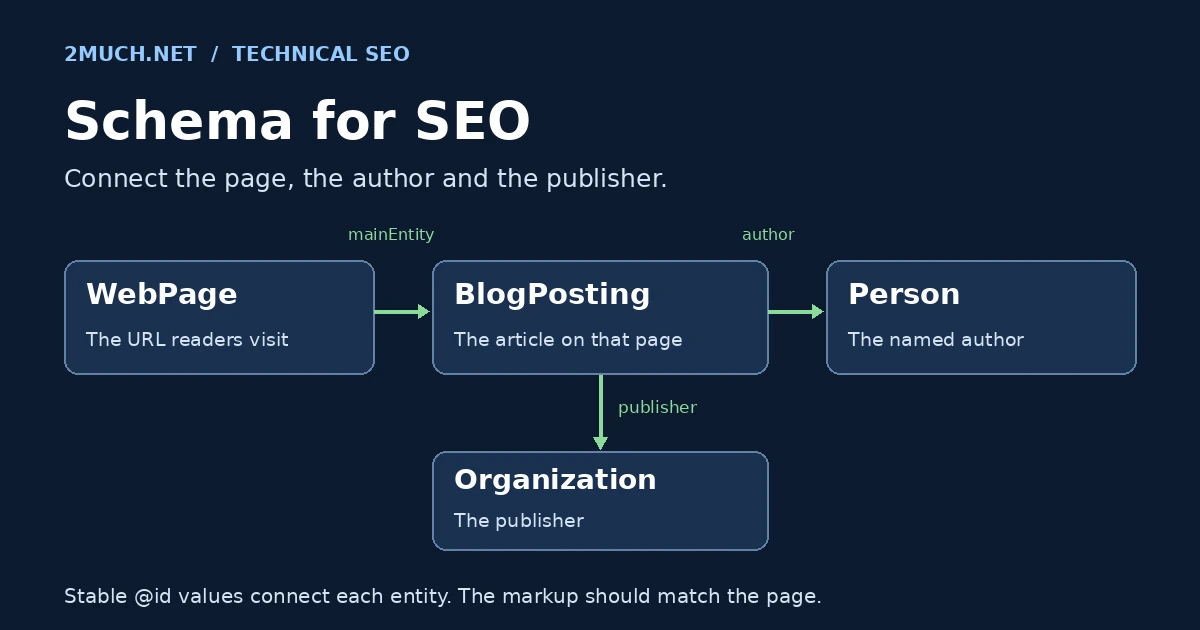
@context identifies the vocabulary. @type identifies the kind of thing being described. @id gives that thing an identifier that other nodes can reuse. The fragment #article distinguishes the article entity from the page URL; it is not a separate page you need to create.
author identifies the writer, while publisher identifies the publishing organization. Keeping those separate avoids turning the company into the writer of every personally authored post. mainEntityOfPage connects the article to its page.
The author URL should lead to a page that identifies the person. The image should represent the article. Dates should agree with what readers see; do not update dateModified on every page request. Google recommends including a time zone when supplying date-and-time values. Its Article documentation covers these recommended properties for Article, NewsArticle and BlogPosting.
The distinction between a page and an article may seem fussy until the site grows. Once you publish interviews, product pages, documentation and videos, separate identifiers let you connect the same author or organization without describing each appearance as an unrelated entity. The Schema.org BlogPosting reference is useful when you need additional properties beyond the core example.
Example 2: describe the route through your site
Breadcrumbs help visitors locate a page in the site’s structure. Their markup is usually short enough to inspect by eye:
<script type="application/ld+json">
{
    "@context": "https://schema.org",
    "@type": "BreadcrumbList",
    "@id": "https://2much.net/schema-for-seo.php#breadcrumb",
    "itemListElement": [
        {
            "@type": "ListItem",
            "position": 1,
            "name": "Home",
            "item": "https://2much.net/"
        },
        {
            "@type": "ListItem",
            "position": 2,
            "name": "Blog",
            "item": "https://2much.net/blog.php"
        },
        {
            "@type": "ListItem",
            "position": 3,
            "name": "Schema for SEO",
            "item": "https://2much.net/schema-for-seo.php"
        }
    ]
}
</script>
The positions begin at 1 and follow the navigation trail. Each item names a step and supplies its URL. On this page, the visible trail is Home / Blog / Schema for SEO. Keep your markup aligned with a sensible path a visitor can follow; do not stuff extra keyword categories into it. See Google’s breadcrumb guide for requirements and examples.
Example 3: keep product data tied to the real offer
Here is a fictional microphone product. The price, brand, SKU and URLs are demonstration values. This belongs on a matching product detail page after replacing those values. In this tutorial it is displayed as code, not published as a real offer.
<script type="application/ld+json">
{
    "@context": "https://schema.org",
    "@type": "Product",
    "@id": "https://example.com/shop/desk-microphone#product",
    "name": "Example USB Desk Microphone",
    "description": "A USB desk microphone with a mute button and adjustable stand.",
    "image": "https://example.com/images/desk-microphone.jpg",
    "sku": "DEMO-MIC-01",
    "brand": {
        "@type": "Brand",
        "name": "Example Audio"
    },
    "offers": {
        "@type": "Offer",
        "url": "https://example.com/shop/desk-microphone",
        "price": "79.00",
        "priceCurrency": "USD",
        "availability": "https://schema.org/InStock",
        "itemCondition": "https://schema.org/NewCondition"
    }
}
</script>
For Google product snippets, name and at least one of offers, review or aggregateRating are required. This example uses an offer. Merchant-listing experiences have additional requirements, so do not treat a basic product-snippet example as a complete shopping integration. Consult the product-snippet documentation for your use case.
The implementation detail that matters most is where these values come from. If the store shows $89 but the schema still says $79, adding more properties will not fix the contradiction. Generate both the visible price and the offer data from the same product record, and invalidate their caches together.
Leave ratings out if there are no genuine ratings to report. Google also excludes self-serving reviews for LocalBusiness and Organization from review-star eligibility, including reviews presented through a third-party widget on the business’s own site. The review-snippet rules explain the distinction. A testimonial is not permission to invent an aggregate score.
Put schema into the system that already owns the content
For a PHP site, generate the markup alongside the HTML. For a CMS, start by inspecting what its theme and SEO plugin already produce. A second schema plugin can add another description of the same article with a different author or publication date.
My recommendation is to give each entity one clear owner in your code. The article template owns the article. The product system owns the offer. The company settings own the publisher’s name and logo. Other templates reference those facts instead of maintaining their own copies.
In PHP, build an array and serialize it with json_encode(). Do not concatenate titles, names or descriptions into JSON strings. Quotes and line breaks in ordinary editorial content will eventually break that approach. This output pattern also escapes characters that could prematurely close an inline script element:
<script type="application/ld+json">
<?php
// $schema is an array assembled from this page's content fields.
echo json_encode(
    $schema,
    JSON_UNESCAPED_SLASHES | JSON_UNESCAPED_UNICODE |
    JSON_HEX_TAG | JSON_HEX_AMP | JSON_HEX_APOS | JSON_HEX_QUOT |
    JSON_THROW_ON_ERROR
);
?>
</script>
Handle encoding failures in your application’s normal error-reporting process, without showing internal errors to visitors. If a required source field is missing, fix that field; do not fill the gap with a plausible-sounding value just to satisfy a validator.
Multiple JSON-LD blocks are not inherently a problem. An article, a breadcrumb trail and an organization can coexist on one page. Conflicting descriptions are the problem. Reusing an @id should mean reusing the same entity, not giving unrelated things the same identifier.
For a static editorial page, serving the markup in the initial HTML is a straightforward choice: you can inspect it with View Source, and it does not depend on a tag manager firing after consent or a browser script completing. Keep the implementation as easy to audit as the content itself.
What does schema do for AI search?
There is no special Schema.org type required for Google AI Overviews or AI Mode. Google says the usual SEO foundations still apply, and that a supporting page must be indexed and eligible to appear in Search with a snippet. Its AI-features guidance does not require an extra AI text file or special markup.
That gives you a practical order of work: allow crawling, publish useful text, make the page discoverable through internal links, and ensure the structured data agrees with the visible content. Good schema complements those tasks. It cannot make an inaccessible article accessible or turn an unsupported claim into evidence.
My view is that clear entity relationships are worthwhile even when no special search feature appears. They make a site’s descriptions more consistent for systems that consume them. That is an implementation rationale, not proof that adding an @id will earn an AI citation. Different search and answer services use different retrieval systems; a Google eligibility rule is not a promise about all of them.
For the article itself, spend time on details a reader can use: a direct definition, headings that answer specific questions, examples with stated assumptions, a named author, and links to original documentation. Give a reader enough context to check your reasoning. Repeating “AI SEO” across the page adds nothing to that work.
Validation has three separate jobs
A green check is useful only if you know what was checked. Work through these layers:
- Does the data parse and use the vocabulary correctly? Use the Schema.org validator to inspect types, properties and relationships. Check the actual output, not just the generator’s input form.
- Does it meet a supported Google feature’s requirements? Use the Rich Results Test. A valid Schema.org type may have no supported Google rich-result feature, so “no items detected” is not automatically a JSON error.
- Can Google retrieve and interpret the deployed page? Use Search Console’s URL Inspection, including the live test where appropriate. Check the response, rendered content, indexing controls and canonical signals.
Then perform the check no syntax tool can complete for you: compare the data with the page. Can a reader find the stated author? Does the product have that price? Is the video actually available there? Google’s structured-data policies require accurate, relevant markup and warn that valid markup alone does not guarantee display.
A quick diagnosis when something looks wrong
- Invalid JSON: look for trailing commas, smart quotes, unescaped text or a script element that ended early.
- The wrong article is detected: inspect every JSON-LD block and any Microdata supplied by the theme. A shared template may be repeating another page’s values.
- Correct markup, no enhanced result: check feature support, content policies and indexing before assuming a technical failure. Eligibility is not a display guarantee.
- Old price, author or date: compare the origin output with the public response. A page cache or CDN may still be serving a previous version.
- Google sees a different page: inspect redirects, canonical URLs, login screens and access controls. Schema cannot resolve those on its own.
Publish with a working discovery path
Link the article from a crawlable page such as your blog index, use its preferred URL consistently, and include that URL in the XML sitemap. A sitemap helps discovery; it does not force indexing. Its lastmod should describe a significant change to the page, rather than changing automatically every day. See Google’s sitemap guidance.
Measure the outcome you actually wanted
Keep a deployment log with the affected URLs, template and date. Separate implementation checks from business results: valid markup, discovery, search appearance, clicks and conversions are different measurements. One can improve without all the others moving.
For a useful comparison, choose a reasonably stable group of pages and avoid changing their copy, titles, internal links and schema all at once. Compare similar periods and account for query mix, position, devices, seasonality and other releases. A higher click-through rate after deployment is a finding to investigate, not automatic proof that schema caused it.
Our guide to using Search Console and GA4 for SEO explains the reporting workflow. For the harder question of whether a change caused an improvement, see measuring the effect of an SEO change.
Questions that come up during implementation
Should every page have schema?
Only add descriptions you can maintain accurately. A small site with correct organization information, clear article authorship and useful breadcrumbs is in a better operational position than one with dozens of unsupported claims in every template. Prioritize important page types, then expand when there is a concrete reason.
Will schema fix a page that is not indexed?
No. Investigate access, response codes, indexing directives, canonicalization and the page’s content first. If the crawler receives an error or cannot reach the content, a more elaborate description of that content does not solve the underlying problem.
Do I need both meta tags and schema?
They serve different purposes. A title, meta description, canonical link and social-preview tags describe or control aspects of the page and its previews. Schema describes entities and relationships. Keep them consistent, but do not assume that adding one replaces the others.
Can I copy these examples as they are?
Use the structure, then replace the facts. The article example describes this 2MUCH.NET page. The microphone example is fictional. Neither should become a claim about your own business through a copy-and-paste deployment.
How often should I revisit the markup?
Check it whenever you change templates, plugins, author profiles, product fields or URL structures. Include representative pages in release checks. Revisit search-feature support periodically too; a schema type can remain valid after a search engine retires its associated presentation.
Before you call it finished
- The type describes the page’s actual main content.
- Names, prices, dates, images and URLs agree with the visible page.
- The author and publisher have distinct, consistent identifiers.
- Example code is displayed as text, not accidentally emitted as real claims.
- The public HTML parses correctly and contains no conflicting template output.
- The page is accessible, internally linked and included in the sitemap.
- You have checked current feature requirements and recorded what changed.
Start with one representative page. Make its description accurate, validate the public output, and then apply the same approach to the rest of that template. That is a manageable maintenance job, and it is how schema stays useful after launch.
About the sources: The linked Schema.org and Google Search Central documents are the primary references for this guide. Search features change; check the current documentation before implementing a feature-specific requirement.